The birth plan, on the iPhone and as a PDF
Meceluna brings the questions of the Ministry of Health (Ministerio de Sanidad) birth plan template. You fill it in at your own pace, save it as a PDF and take it to the hospital printed or on your mobile.
It is on the App Store for iPhone, free. Plus is optional.
Download on the App Store · iPhone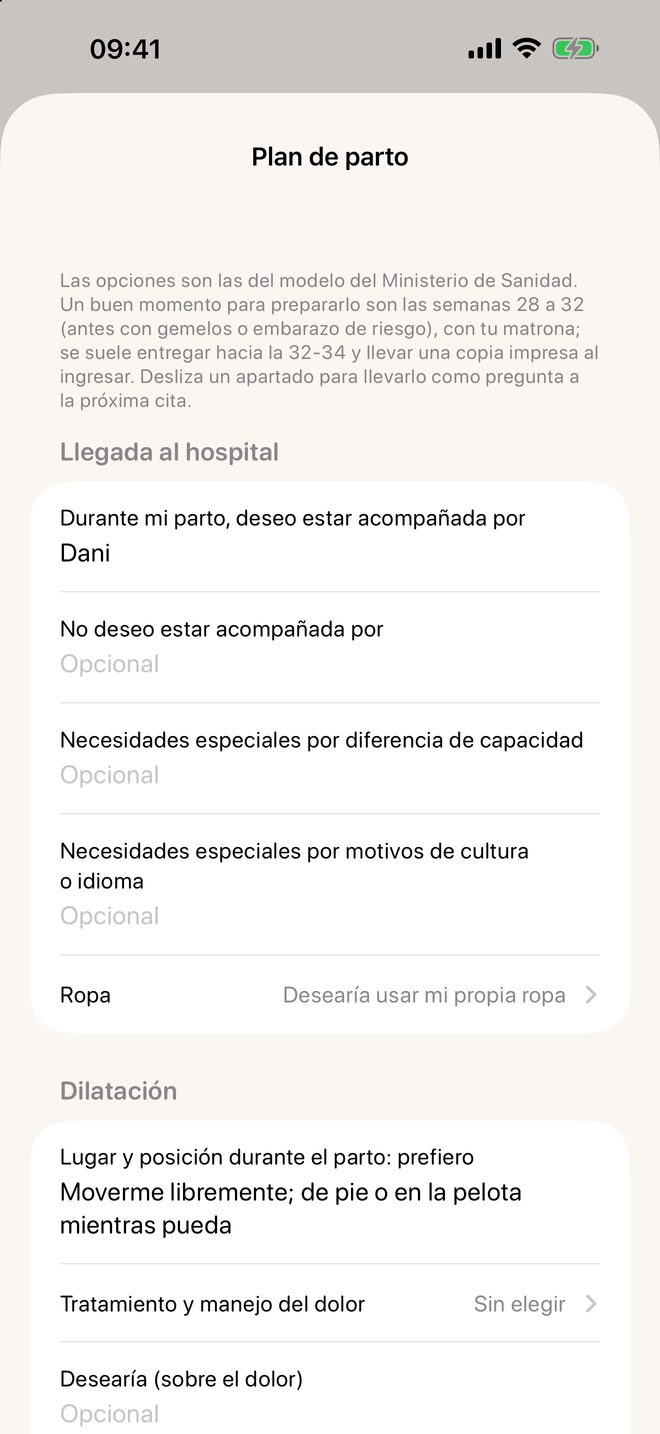
How it works in Meceluna
- In the Baby tab (or in Agenda), open “Birth plan”.
- Choose or write what you want in each section. Whatever you are unsure about can be left blank.
- Export it as a PDF or as text: it is saved in Documents so you can print it or show it.
When to do it
The template suggests preparing it between weeks 28 and 32, earlier with twins or a high-risk pregnancy, together with your midwife. Meceluna puts it in the next steps when the time comes.
Where it comes from
From the Ministry of Health birth plan template (modelo de plan de parto y nacimiento del Ministerio de Sanidad): same sections, such as arrival at the hospital or dilation.
What it does not do
It does not recommend any option. Whatever you choose, you discuss with your midwife and with the hospital. It is free.
The essentials of Meceluna are free and have no ads.
Download on the App Store · iPhone